Monitoring your website or blog’s traffic is a mandatory task for every webmaster, blogger, or site owner. That’s exactly where a traffic analytics tool like Google Analytics steps in. But this article isn’t about Google Analytics, it’s a Clicky review where I’ll also explain why I ditched the world’s most popular and free traffic monitoring tool in favor of a less popular, paid alternative.
So, what exactly is Clicky? Simply put, it’s a powerful web analytics tool and a direct competitor to Google Analytics 4 and other traffic monitoring solutions available online. Unlike complex data visualization software that overwhelms users, Clicky stands out as an easy-to-use platform with a clean, intuitive dashboard that makes tracking real-time data straightforward even for beginners. It’s especially popular as a real time analytics solution for small business owners who need quick, actionable insights without a steep learning curve. Beyond its simplicity, Clicky also packs some impressive advanced features that I’ll cover shortly. Currently, the platform tracks traffic across over 1.2 million websites worldwide. And while it is a premium analytics tool, you can test it out completely free for 21 days before spending a dime.
Core benefits of using Clicky
1. Simple and Easy-to-use Dashboard:
Maybe this is No.1 reason why thousands of webmasters switched from other traffic analytics tool to Clicky.
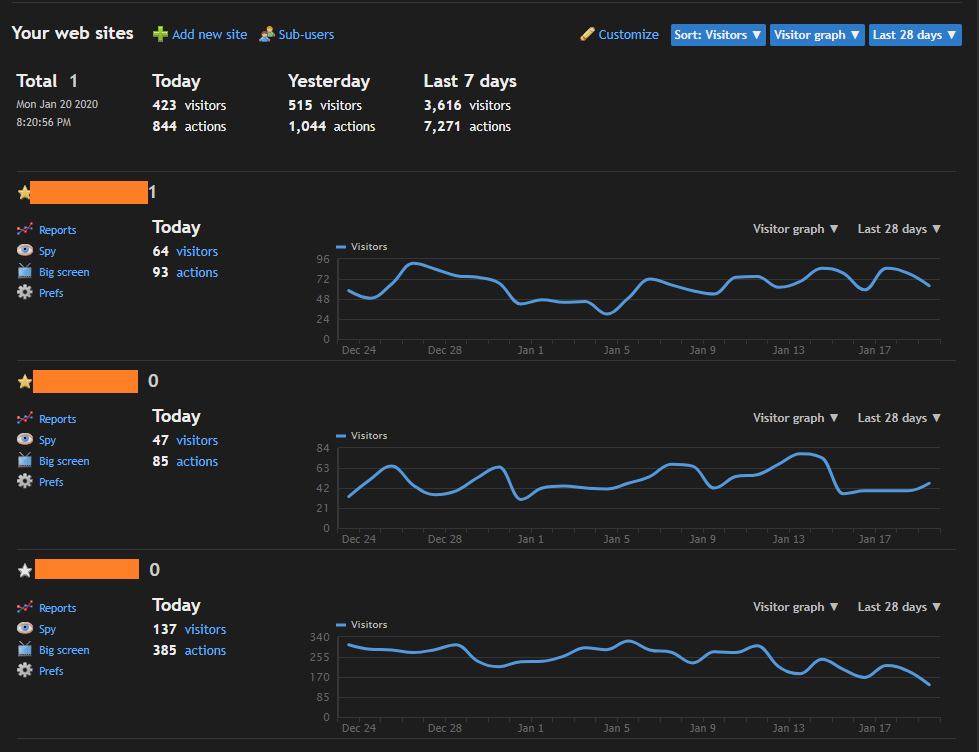
Upon logging into Clicky you will notice this beautiful dashboard with your site names, today’s traffic stats, and a graph that contains traffic data of last 28 days. You can easily change the graph based on your need and preference. Looks dark? because Clicky has a dark mode (along with regular light mode) and I love it.

This view is the gem and the only reason why I have ditched Google Analytics for Clicky. That’s true! Just have a look, the amount of information you can consume, track, and analyze from this single page which would take 10+ clicks in Google Analytics. Live Traffic stat, today’s real-time traffic stat, traffic sources, most visited pages, Geo traffic sources, search keywords that brought in traffic, comparison based traffic graph, and what not? I will let you be the judge.
2. Heat map tracking
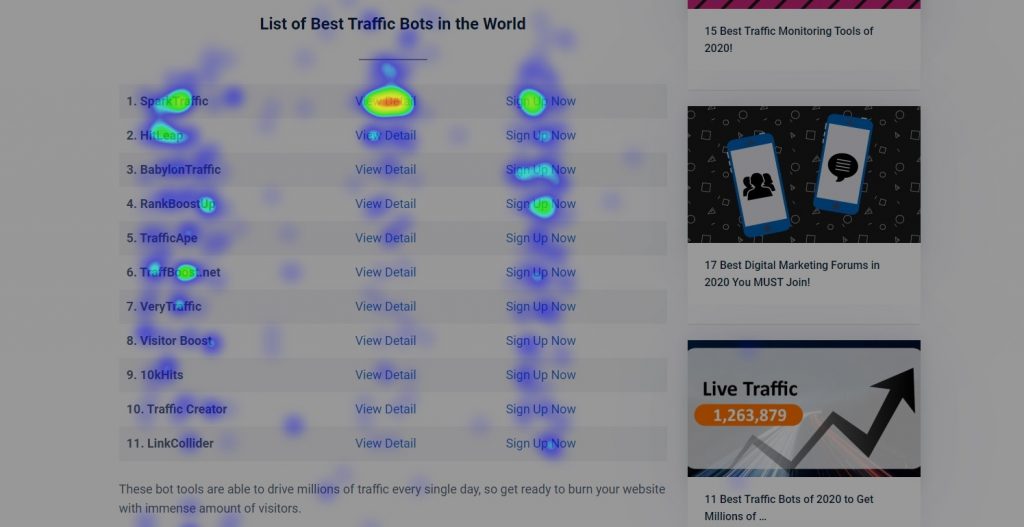
Heat map used to be one of the most expensive and advanced tracking of visitor’s behavior. Not anymore, Clicky brought this high-end tracking technology at such affordable prices that any beginner can use and get to know how visitors are interacting with the web page or any specific article.
With the help of heap map data you can easily improve user experience and increase conversion rate. It also helps to know what users are not understanding or not liking.
3. Traffic Flow Monitoring

Internal linking building is a great way to improve page views, but how effective your internal linking is working? You can easily monitor the traffic flow of your website to get a clear idea of which links are driving internal page views and which links are driving your visitor out of your site.
4. Conversion Tracking
Conversion such as download, sale, lead generation etc. could be the core target of your business. There are lots of highly expensive tools to track conversion but Clicky has this feature at a lot less price. I can’t give you a live example of this feature as I am not selling or collecting leads. Just check out the goal tab and set your conversion tracking system with Clicky.
5. Up-time Monitoring
Have you ever noticed that your website is down? Don’t worry, it happens due to several reasons but not tracking downtime may cost you in the long run. You don’t need to use any 3rd party tool, because Clicky provides 1-minute interval up-time checking which means it will check your site after every one minute and if your site goes down you will be notified immediately.
It’s not the end, there are many other premium features you will enjoy as the user of Clicky.

Pricing and Refund Policy of Clicky
There are lots of features like heat map, conversion tracking, uptime monitoring etc are not available in Google Analytics. If you dig deeper, there are many other tools that are providing such advanced benefits but charging enterprise-level money such as $50-$100 per month. As Clicky is made for general site owners it has pretty lucrative pricing for premium accounts which starts at the price of a coffee from Starbucks.

In case you need a refund after subscribing to the premium plan of Clicky, they are generous enough to refund you the money for the unused period.
Support from the team is most crucial when it comes to any tool or service that you are purchasing online. Though Clicky does not support live chat, they are pretty good at providing support via Email. You can also browse the knowledge base section in order to solve your issue before contacting the support team.
Check out Pros and Cons table of Clicky tool.
| Pros | Cons |
| Single dashboard | Metered traffic |
| Advanced tracking systems | |
| Allowing sub-users | |
| Up-time monitoring | |
| Avoids spam traffic |
The main purpose of this Clicky review tool is to enlighten you about this alternative to Google Analytics which works even better. The final decision is yours whether you want to try or not.
If you liked this review article on Clicky and want to see more such honest reviews please do encourage me by sharing this article on social media. In addition you are most welcome to share your opinion via comment section of this article.